NLP and Speech-to-Text: How Spoken Words Become Useful Data
Speech is one of the most natural ways people communicate, but computers need spoken language converted into a format they can process. Speech-to-text technology does this by turning audio into written words. Natural language processing (NLP) can then help interpret, organize, and act on those words.
Together, speech recognition and NLP power tools such as voice assistants, meeting transcription services, captioning systems, and customer support applications. Understanding how these technologies work—and where they can fall short—helps businesses and individuals choose and use them effectively.
What Is Speech-to-Text?
Speech-to-text, also called automatic speech recognition (ASR), is the process of converting spoken audio into text. A speech recognition system analyzes sound patterns and predicts the words a speaker said. The result may be a verbatim transcript, captions, or text prepared for another application.
Speech-to-text is not the same as understanding speech. A system may transcribe a sentence accurately without knowing what the speaker intends. That is where NLP comes in.
What Does NLP Add?
Natural language processing is a field of computing focused on working with human language. After speech has been transcribed, NLP techniques can help a system determine what the words mean and what should happen next.
For example, a speech-to-text system might transcribe, “Move my meeting with Jordan to Friday.” An NLP system could identify the request, recognize Jordan as a person, extract Friday as a date, and pass the information to a calendar application. The transcription provides the words; NLP helps interpret them in context.
How the Process Works
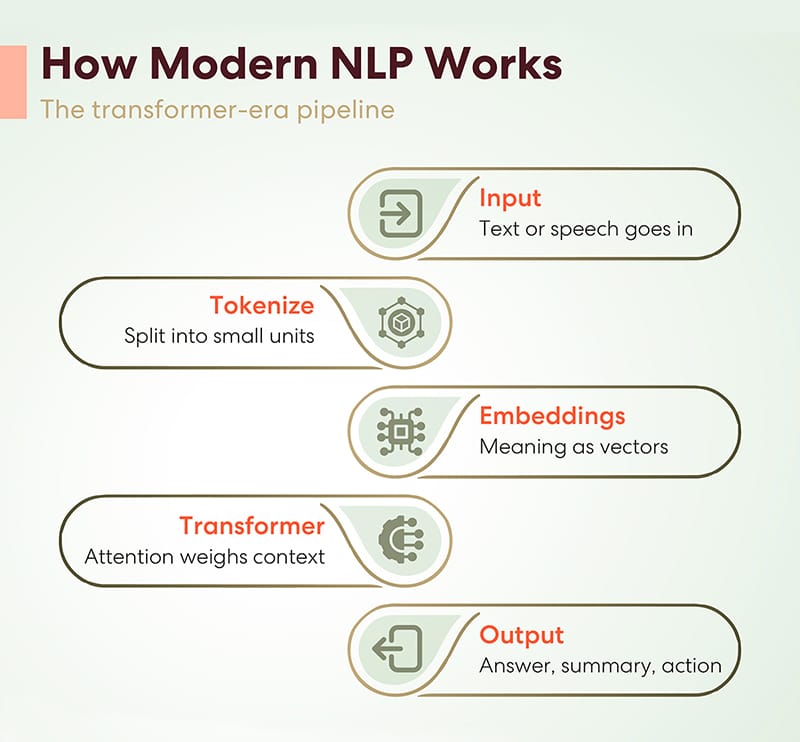
- Audio capture: A microphone records a speaker’s voice. The quality of the recording can affect every later step.
- Audio processing: The system may reduce background noise, detect speech, and divide the audio into manageable segments.
- Speech recognition: An ASR model analyzes the sound and generates a likely sequence of words.
- Text processing: NLP tools can add punctuation, identify speakers or topics, classify intent, extract important details, or summarize the transcript.
- Review or action: The text may be shown to a user, stored, searched, or used to trigger an action. Important results may require human review.
These stages are often integrated into a single product, but they solve different problems. Speech recognition focuses on what was said; NLP focuses on what the words communicate and how they can be used.
Common Applications
- Transcription: Converting interviews, lectures, calls, and notes into searchable text.
- Live captions: Displaying spoken words in real time to support accessibility and comprehension.
- Voice assistants: Interpreting spoken requests, such as setting a timer or checking the weather.
- Customer service: Transcribing calls and identifying common questions, topics, or customer concerns.
- Healthcare documentation: Helping clinicians dictate notes, subject to appropriate privacy, security, and review practices.
- Media and content workflows: Creating draft captions, subtitles, and transcripts for audio or video.
Why Accurate Transcription Can Be Difficult
Speech varies widely. People speak with different accents, at different speeds, and with different pronunciations. They may use slang, technical terms, names, or words that are uncommon in a system’s training data. Overlapping speakers, music, echo, and background noise can also make recognition harder.
Context matters, too. Words that sound alike may have different meanings, and a short phrase can be ambiguous without surrounding information. Punctuation and capitalization are not directly present in audio, so systems must infer them. Speaker identification and emotion detection introduce additional uncertainty and should not be treated as infallible.
Performance can vary by language, dialect, recording conditions, and subject matter. A transcript that appears fluent may still contain errors, so high-stakes uses should include a review process.
Choosing a Speech-to-Text Solution
When evaluating a tool, consider more than its advertised accuracy. Ask whether it supports the languages and accents your users need, how it handles specialized vocabulary, and whether it works with live audio, uploaded recordings, or both. Check options for speaker labels, timestamps, editing, exports, and integration with other software.
Privacy and data handling are equally important. Find out whether audio or transcripts are stored, who can access them, how long they are retained, and whether they may be used to improve the service. Organizations handling sensitive information should assess security controls and applicable legal or regulatory requirements before adopting a solution.
Best Practices for Better Results
- Use a good microphone and record in a quiet environment when possible.
- Reduce echo and avoid placing speakers too far from the microphone.
- Provide relevant vocabulary, names, or terminology if the tool supports it.
- Review transcripts before publishing them or using them to make important decisions.
- Tell participants when recording or transcription is taking place, and follow applicable consent requirements.
- Use human judgment for ambiguous language, sensitive conversations, and high-impact decisions.
The Future of NLP and Speech-to-Text
Speech technology continues to develop, with improvements in multilingual recognition, real-time processing, speaker separation, and the ability to work across different kinds of audio. NLP systems are also becoming better at turning transcripts into summaries, extracting action items, and supporting voice-based interactions.
Even as these tools improve, they do not eliminate the need for context, consent, and oversight. The most effective systems combine automation with clear privacy practices and human review where accuracy matters.
Conclusion
Speech-to-text converts spoken language into written words, while NLP helps interpret and use those words. Together, they make it possible to search conversations, create captions, automate routine tasks, and interact with software by voice. Understanding the difference between transcription and language understanding—and recognizing the limits of both—can help users put these technologies to work responsibly.
NLP and Speech-to-Text: 5 Frequently Asked Questions
- What is the difference between NLP and speech-to-text?
- How does NLP work with speech-to-text technology?
- How accurate is speech-to-text transcription?
- What are common uses of NLP and speech-to-text?
- How can I improve speech-to-text accuracy?
What is the difference between NLP and speech-to-text?
Speech-to-text converts spoken audio into written words, while natural language processing (NLP) helps computers interpret and work with those words. For example, speech-to-text can transcribe “Schedule a meeting for Friday,” and NLP can identify it as a request, recognize the date, and send the details to a calendar app. In short, speech-to-text captures what was said; NLP helps determine what it means.
How does NLP work with speech-to-text technology?
NLP works with speech-to-text technology by helping computers interpret and use spoken language after it has been converted into text. Speech recognition identifies the words in an audio recording, while NLP analyzes their context and structure to determine meaning, detect intent, identify names or dates, and perform tasks such as summarizing or categorizing the transcript. Together, these technologies enable applications like voice assistants, searchable meeting notes, and automated customer support.
How accurate is speech-to-text transcription?
Speech-to-text accuracy depends on factors such as audio quality, background noise, accents, speaking speed, overlapping voices, and specialized vocabulary. Clear recordings with one speaker often produce more reliable transcripts, while noisy or complex audio can lead to errors in words, punctuation, and speaker labels. Accuracy also varies by language and transcription tool, so review important transcripts—especially those used for medical, legal, or business decisions—before relying on them.
What are common uses of NLP and speech-to-text?
NLP and speech-to-text are commonly used to transcribe meetings, interviews, lectures, and phone calls; generate live captions and subtitles; and power voice assistants and hands-free commands. NLP can further analyze the resulting text by identifying topics, extracting key details, summarizing conversations, classifying customer feedback, or recognizing a user’s intent. Together, these technologies help make audio searchable, support accessibility, and streamline tasks in fields such as education, customer service, healthcare, and media.
How can I improve speech-to-text accuracy?
To improve speech-to-text accuracy, record in a quiet space, use a quality microphone, and position it close to the speaker while avoiding echo and overlapping voices. Speak clearly at a steady pace, and choose a tool that supports the speaker’s language, accent, and specialized vocabulary. If available, add names or technical terms to a custom vocabulary. Review and correct the transcript before relying on it, especially for important information, since background noise, accents, and similar-sounding words can still cause errors.