What Is an NLP Query?
An NLP query is a question or instruction written in natural language that a computer system interprets and responds to. “NLP” stands for natural language processing, a field of artificial intelligence focused on helping computers understand and work with human language.
Unlike a traditional search query made up of keywords, an NLP query can be phrased the way someone would speak or write. For example, instead of searching for “weather Boston Friday,” a person might ask, “Will it rain in Boston this Friday?” An NLP-powered system can analyze the sentence, identify the location and date, and look for the relevant forecast.
How NLP Queries Work
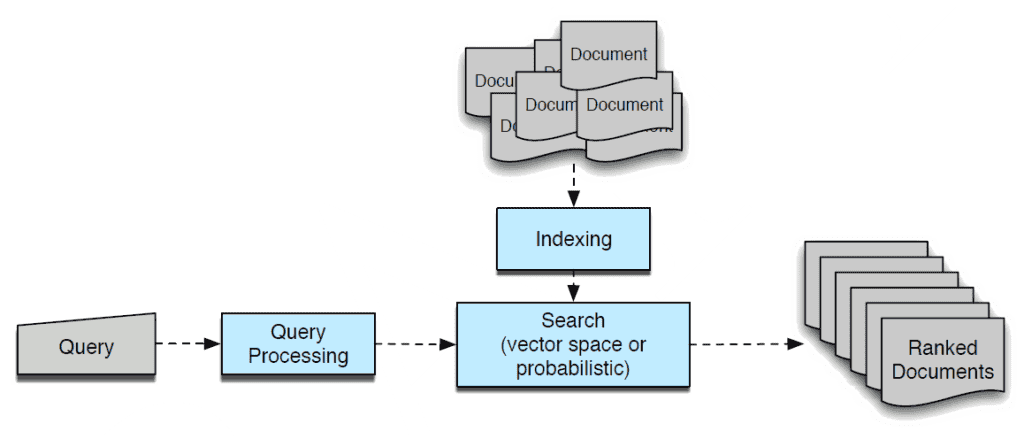
When a system receives an NLP query, it typically processes the text in several stages. The exact steps vary by application, but they often include:
- Breaking down the text: The system separates the query into words or smaller units called tokens.
- Identifying intent: It estimates what the user wants, such as finding information, making a reservation, or getting a summary.
- Extracting key details: It identifies useful information, such as names, dates, locations, products, or other entities.
- Interpreting context: It considers how words relate to one another and, when available, what was said earlier in the conversation.
- Finding or generating a response: The system retrieves relevant information, performs an action, or produces an answer.
For instance, in the query “Show me vegetarian restaurants near Chicago open tonight,” a system may identify the user’s intent as finding restaurants, “vegetarian” as a preference, “near Chicago” as a location, and “tonight” as a time constraint.
Examples of NLP Queries
NLP queries appear in many everyday tools and services. Examples include:
- Search engines: “How do I renew my passport?”
- Voice assistants: “Set a timer for 15 minutes.”
- Customer support: “Where is my order?”
- Business data tools: “Compare sales in California and Oregon last quarter.”
- Translation tools: “Translate ‘See you tomorrow’ into Spanish.”
In each case, the system aims to understand the meaning behind the wording rather than simply match individual keywords.
NLP Queries and Database Queries
A natural-language query is not the same as a database query, although the two can work together. A database query is a structured instruction, often written in a language such as SQL, that tells a database what information to retrieve. An NLP system can let a person ask a question in everyday language, then translate that request into a structured database query.
For example, a user might ask, “How many orders did we receive last month?” A system could interpret the request, identify the relevant date range and data fields, and create a database query to retrieve the answer. This approach can make data tools easier to use for people who do not know SQL.
What Makes an NLP Query Effective?
Modern systems can handle casual wording, but clear requests can still improve results. To make a query easier to interpret:
- State the task directly.
- Include relevant details such as dates, locations, or preferences.
- Specify the format you want, such as a list, summary, or comparison.
- Clarify words that could have multiple meanings.
- Provide context when asking a follow-up question.
For example, “Summarize this report in five bullet points for a nontechnical audience” gives more useful direction than “Summarize this.”
Common Challenges
Human language can be ambiguous, context-dependent, and full of idioms. A query such as “Find the best bank near me” could refer to a financial institution or a riverbank, depending on context. Systems may also struggle with misspellings, unfamiliar names, regional expressions, or requests that leave out important information.
Privacy is another consideration. Queries may contain personal or sensitive details, so users should be mindful of the information they share and review how a service handles submitted data. NLP systems can also make mistakes, so important answers should be checked against reliable sources.
Why NLP Queries Matter
NLP queries make technology more accessible by allowing people to interact with software in familiar language. They can simplify search, support customer service, help employees explore business data, and make digital tools easier to use across different levels of technical experience.
As language technologies continue to develop, NLP queries are becoming a common way to ask questions and get things done. Understanding how they work—and how to phrase them clearly—can help users get more relevant, useful results.
9 Tips for Writing Clear, Effective NLP Queries
- Use clear, specific wording.
- Include the key terms.
- State your goal upfront.
- Add relevant context.
- Avoid vague pronouns.
- Ask one question at a time.
- Specify the desired format.
- Use examples when helpful.
- Review results for accuracy.
Use clear, specific wording.
Use clear, specific wording when writing an NLP query to help the system understand exactly what you need. Include important details such as names, dates, locations, or preferred formats, and avoid vague phrases that could have multiple meanings. For example, instead of asking, “Find a good place nearby,” try, “Find highly rated Italian restaurants within two miles of downtown Seattle that are open tonight.” The more precise your query, the more relevant and useful the response is likely to be.
Include the key terms.
When writing an NLP query, include the key terms that describe what you need, such as the topic, action, location, date, or preferred format. These details help natural language processing systems identify your intent and extract important information, leading to more relevant and accurate results. For example, “Find vegetarian restaurants in Austin open tonight” is clearer than “Find a place to eat” because it includes the cuisine, location, and time.
State your goal upfront.
State your goal upfront when writing an NLP query so the system can quickly understand what you need. Begin with a clear action, such as “summarize,” “compare,” “translate,” or “find,” then add any useful details. For example, “Compare the monthly costs of these two plans” is more specific than “Tell me about these plans” and is more likely to produce a relevant response.
Add relevant context.
Adding relevant context to an NLP query helps the system understand what you mean and provide a more accurate, useful response. Include details such as your goal, audience, timeframe, location, or any earlier information the system may need. For example, instead of asking, “What should I include?” try, “I’m writing a beginner’s guide to home gardening; what should I include in a section about choosing soil?” The clearer the context, the less likely the system is to misinterpret your request.
Avoid vague pronouns.
Avoid vague pronouns in an NLP query by naming the person, item, or idea you mean instead of relying on words like “it,” “they,” or “that.” These pronouns can refer to more than one thing, making it harder for the system to understand your request. For example, replace “Compare these products and tell me if it is cheaper” with “Compare these products and tell me which product costs less.” Clear references help an NLP system interpret your intent and return a more accurate answer.
Ask one question at a time.
Ask one question at a time to help an NLP system understand exactly what you need. Combining several requests in a single query can make it unclear which details belong to each question or which task should be handled first. For clearer, more relevant answers, submit each question separately and include any important context in that request.
Specify the desired format.
Specify the desired format when writing an NLP query to make the response more useful and easier to scan. For example, ask for “a three-bullet summary,” “a comparison table,” or “a step-by-step guide” instead of making a general request. Clear formatting instructions help the system organize its answer to match your needs.
Use examples when helpful.
When writing an NLP query, include examples when they can clarify what you mean or the kind of response you want. For instance, if you need product descriptions in a particular style, provide a sample sentence; if you want data grouped in a certain way, show a sample format. Examples give the system helpful context, reduce ambiguity, and make it more likely to return a relevant result.
Review results for accuracy.
Review the results of an NLP query for accuracy before relying on them. Language-processing systems can misunderstand context, overlook important details, or provide outdated or incomplete information. Check key facts against reliable sources, and refine your query if the response doesn’t fully address what you asked. This is especially important when using results to make decisions or share information with others.