NLP Business Applications: How Companies Use Language Technology
Businesses communicate through enormous amounts of language: customer emails, support chats, contracts, product reviews, reports, and internal documents. Natural language processing (NLP) helps organizations analyze and work with this information using software that can process human language. It can support tasks such as classifying messages, extracting key details, summarizing documents, and generating draft responses.
NLP is not a replacement for human judgment. Its value comes from helping people handle language-heavy work more efficiently, find useful information, and make better-informed decisions.
What Is NLP?
Natural language processing is a field of artificial intelligence focused on enabling computers to work with written or spoken language. NLP systems can identify patterns in text, recognize entities such as names and dates, determine the topic or sentiment of a message, and generate or transform language.
Common NLP capabilities include:
- Text classification: Assigning categories to messages, such as billing questions, complaints, or sales inquiries.
- Sentiment analysis: Estimating whether language expresses positive, negative, or neutral sentiment.
- Entity extraction: Identifying details such as company names, locations, product IDs, and dates.
- Search and retrieval: Finding relevant information in large collections of documents.
- Summarization: Producing shorter versions of long documents or conversations.
- Language generation: Drafting responses, descriptions, reports, or other text for review.
- Speech recognition: Converting spoken language into text for analysis or transcription.
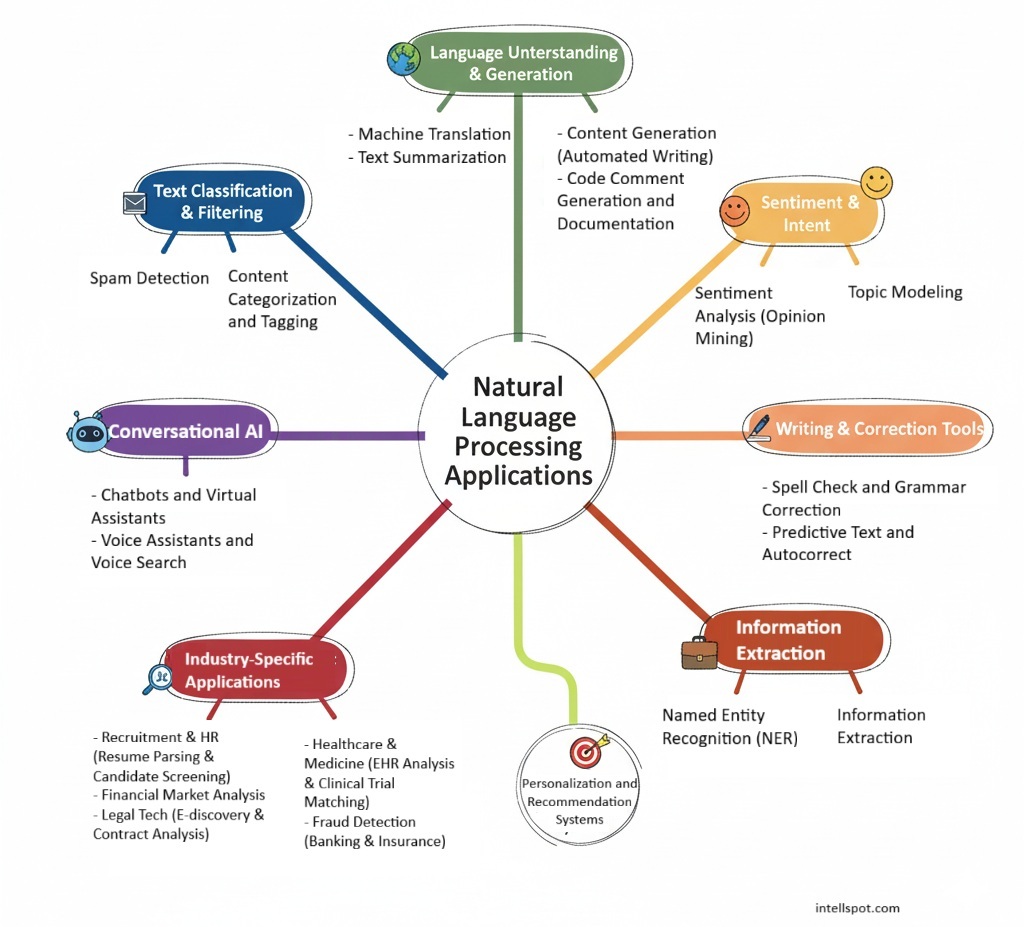
Key NLP Business Applications
Customer Service and Support
Customer service teams receive requests across email, chat, social media, and phone channels. NLP can sort incoming messages by topic, identify urgent issues, and route requests to the right team. It can also help support agents search knowledge bases, summarize previous interactions, and draft responses.
Chatbots and virtual assistants can answer common questions or guide customers through routine tasks. More complex or sensitive requests can be escalated to a person. This approach can make support more responsive while allowing employees to focus on situations that require empathy, context, or specialized knowledge.
Voice of the Customer and Market Research
Reviews, surveys, support conversations, and social media posts contain direct feedback about products and services. NLP tools can organize this feedback by theme, such as pricing, usability, delivery, or product quality. Sentiment analysis can provide a broad view of customer reactions, while topic analysis can help reveal recurring concerns or requests.
These systems are most useful when their results are treated as signals rather than definitive conclusions. Sarcasm, cultural context, and mixed opinions can make sentiment difficult to interpret, so teams should validate automated findings against the original feedback.
Document Processing and Workflow Automation
Many business processes depend on information buried in documents. NLP can help extract names, dates, addresses, payment terms, or other fields from invoices, applications, forms, and agreements. The extracted information can then be checked, entered into business systems, or sent for approval.
Automating parts of document processing can reduce repetitive data entry and make it easier to search records. Human review is still important, especially when errors could affect payments, legal obligations, eligibility decisions, or customer outcomes.
Search and Knowledge Management
Employees often spend time looking for answers across policy documents, product manuals, project files, and internal knowledge bases. NLP-powered search can interpret natural-language questions and retrieve passages that are relevant to a user’s request.
Some systems can also generate a concise answer based on retrieved company materials. For these tools to be reliable, the underlying information should be current, access controls should be respected, and answers should link back to their sources so users can verify them.
Sales and Marketing
NLP can support sales and marketing teams by analyzing customer questions, organizing sales notes, summarizing calls, and identifying common themes in campaign responses. It can also help draft product descriptions, email variations, and other marketing content.
Generated content should be reviewed for accuracy, brand voice, originality, and compliance with applicable rules. Personalization should also be handled responsibly, with appropriate attention to customer consent and data protection.
Compliance, Risk, and Monitoring
Organizations in regulated industries may use NLP to search communications and documents for specific terms, identify records that need review, or assist with policy monitoring. It can help teams manage large volumes of text, but it should not be treated as a substitute for legal, compliance, or risk expertise.
Because automated systems can miss context or flag harmless language, human review and clear escalation procedures are essential. Organizations should also document how these tools are used and retain appropriate records of important decisions.
Human Resources and Employee Support
NLP can help employees find answers to routine questions about benefits, policies, and workplace procedures. It can also assist HR teams with organizing feedback or summarizing employee surveys.
Applications involving hiring, performance, or other high-impact employment decisions require particular care. Automated analysis may reflect bias in historical data or misunderstand a person’s language. Employers should evaluate these systems carefully, provide meaningful oversight, and follow applicable employment and privacy requirements.
Benefits of NLP for Businesses
When selected and implemented thoughtfully, NLP can provide several practical benefits:
- Less repetitive work: Routine classification, extraction, and summarization can be partially automated.
- Faster access to information: Employees can search large collections of text more efficiently.
- More consistent workflows: Standardized processes can help teams handle similar requests in similar ways.
- Better visibility into feedback: Analyzing large volumes of comments can help organizations spot recurring themes.
- Improved service operations: Routing and drafting tools can help teams respond to requests more effectively.
Results depend on the quality of the data, the suitability of the technology, and how well the tool fits into existing workflows. NLP does not automatically improve a process that is poorly designed or based on incomplete information.
Challenges to Consider
Accuracy and Context
Language is ambiguous. A phrase can have different meanings depending on its context, and a system may misunderstand industry terms, humor, or regional expressions. Business users should test tools on realistic examples and provide a way to correct mistakes.
Privacy and Security
Business text may contain personal information, confidential plans, or regulated data. Before sending information to an NLP service, organizations should review its data handling, retention, security, and access-control practices. Sensitive data should be managed according to company policies and applicable laws.
Bias and Fairness
Models can reproduce patterns in the data used to develop or configure them. This can lead to uneven performance across groups or types of language. Testing should consider different users and scenarios, with ongoing monitoring for disparate or harmful outcomes.
Integration and Change Management
A tool must work with the systems employees already use and fit into how work gets done. Teams also need training, clear guidelines, and a process for escalating exceptions. Without these elements, employees may avoid the tool or rely on its output in ways it was not designed for.
How to Get Started with NLP
- Choose a specific problem. Start with a clear use case, such as routing support tickets or searching internal policies.
- Define success measures. Decide how results will be evaluated, such as reduced processing time, improved search relevance, or fewer manual classification steps.
- Review the data. Check whether the text is accurate, representative, and appropriate to use for the intended purpose.
- Run a limited pilot. Test the solution with a small group and realistic examples before expanding it.
- Keep people involved. Set expectations for human review, corrections, and escalation, especially for consequential decisions.
- Monitor and improve. Track performance over time, review errors, and update the system as business needs and language change.
The Future of NLP in Business
NLP tools continue to develop, including systems that combine language processing with search, data analysis, and content generation. These capabilities may make it easier to work across large collections of company information and support more natural interactions with business software.
As the technology advances, responsible implementation will remain essential. Organizations will need to balance efficiency with accuracy, privacy, security, transparency, and human oversight.
Conclusion
NLP business applications range from customer support and document processing to market research, knowledge search, and compliance workflows. The strongest use cases are specific, measurable, and supported by reliable data and appropriate human review. By starting with a real business need and evaluating results carefully, companies can use NLP to make language-heavy work more manageable without losing sight of the people behind the words.
NLP Business Applications: 8 Frequently Asked Questions
- What is natural language processing (NLP), and how can businesses use it?
- What are the most common business applications of NLP?
- How can NLP improve customer service and support?
- Can NLP analyze customer feedback, reviews, and social media posts?
- How does NLP automate document processing and data extraction?
- What are the benefits of using NLP in business?
- What challenges and risks should businesses consider when implementing NLP?
- How can a business get started with an NLP solution?
What is natural language processing (NLP), and how can businesses use it?
Natural language processing (NLP) is a field of artificial intelligence that helps computers understand, analyze, and generate human language. Businesses use NLP to automate tasks such as sorting customer support requests, analyzing reviews and feedback, extracting information from documents, improving search, summarizing conversations, and drafting responses. These applications can save time and help teams find useful insights in large volumes of text, while human review remains important for accuracy, privacy, and sensitive decisions.
What are the most common business applications of NLP?
The most common business applications of NLP include customer service chatbots and virtual assistants, sorting and routing support requests, analyzing customer feedback and sentiment, extracting information from documents, and improving search across company knowledge bases. Businesses also use NLP to summarize conversations and reports, transcribe speech, support sales and marketing content, and monitor communications for compliance. These tools can reduce repetitive work and help teams find useful insights, while human review remains important for accuracy and sensitive decisions.
How can NLP improve customer service and support?
NLP can improve customer service by automatically identifying what customers need, sorting and routing requests to the right team, and helping answer common questions through chatbots or virtual assistants. It can also summarize conversations, surface relevant information for support agents, and analyze feedback to reveal recurring issues. These tools can speed up responses and reduce repetitive work, while human agents remain essential for complex, sensitive, or unusual situations.
Can NLP analyze customer feedback, reviews, and social media posts?
Yes. NLP can analyze customer feedback, online reviews, and social media posts by identifying recurring topics, classifying comments by sentiment, and highlighting common questions or concerns. These insights can help businesses understand customer preferences, track reactions to products or campaigns, and spot emerging issues. Because sarcasm, slang, and context can affect accuracy, automated results should be reviewed alongside the original comments.
How does NLP automate document processing and data extraction?
NLP automates document processing by classifying incoming files, identifying relevant information—such as names, dates, invoice numbers, and payment terms—and converting it into structured data for business systems. For scanned documents, optical character recognition (OCR) first converts images into text that NLP tools can analyze. Extracted details can then be validated, routed for approval, or used to trigger workflows, reducing manual data entry and speeding up processing. Human review is still important for ambiguous documents or high-impact decisions.
What are the benefits of using NLP in business?
Using NLP in business can help organizations process large volumes of text faster, automate repetitive tasks like sorting customer inquiries and extracting information from documents, and find useful patterns in feedback, reports, and conversations. It can also improve customer support, make company knowledge easier to search, and help teams make more informed decisions. The greatest benefits come when NLP tools are matched to a clear business need and their results are checked by people.
What challenges and risks should businesses consider when implementing NLP?
Businesses implementing NLP should consider challenges such as inaccurate or context-insensitive results, bias in training data, and difficulty handling industry-specific language or diverse communication styles. NLP systems may also process sensitive customer or employee information, making privacy, security, data retention, and regulatory compliance important concerns. Integration with existing systems and workflows can require time, technical resources, and employee training. To reduce these risks, businesses should test tools with representative data, monitor performance, protect sensitive information, and keep human review in place—especially when outputs could affect important decisions.
How can a business get started with an NLP solution?
A business can get started with an NLP solution by choosing a specific, well-defined problem, such as sorting customer inquiries, extracting information from documents, or searching internal knowledge. Next, assess the quality and privacy requirements of the data, select a tool that fits existing workflows, and run a small pilot with clear success measures. Have employees review the system’s results, especially when decisions could affect customers or staff, then use feedback to refine the solution before expanding it.